
Survey Form
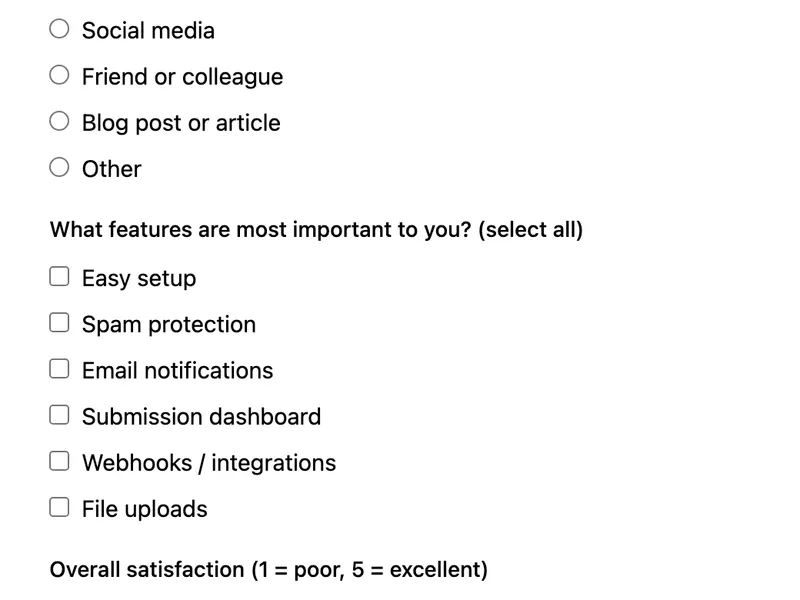
A survey form template with multiple question types: radio buttons for single-choice, checkboxes for multi-select, and a satisfaction scale. Collects structured, analyzable responses without a dedicated survey platform. Export results as CSV from the FormWit dashboard for analysis.
Template Code
HTML
<form action="https://app.formwit.com/api/s/YOUR_FORM_ID" method="POST"
  style="max-width:520px;margin:0 auto;font-family:system-ui,sans-serif">
  <h2 style="margin:0 0 4px;font-size:22px;font-weight:700">Quick Survey</h2>
  <p style="margin:0 0 20px;font-size:15px;color:#6b7280">Help us improve — takes under 2 minutes.</p>

  <div style="margin-bottom:16px">
    <label for="email" style="display:block;margin-bottom:4px;font-weight:500;font-size:14px">Email (optional)</label>
    <input type="email" id="email" name="email" placeholder="your@email.com"
      style="width:100%;padding:10px 12px;border:1px solid #d1d5db;border-radius:8px;font-size:16px;box-sizing:border-box" />
  </div>

  <fieldset style="margin-bottom:16px;border:none;padding:0">
    <legend style="font-weight:500;font-size:14px;margin-bottom:8px">How did you hear about us?</legend>
    <label style="display:block;padding:6px 0;font-size:15px"><input type="radio" name="source" value="Search engine" style="margin-right:8px" />Search engine</label>
    <label style="display:block;padding:6px 0;font-size:15px"><input type="radio" name="source" value="Social media" style="margin-right:8px" />Social media</label>
    <label style="display:block;padding:6px 0;font-size:15px"><input type="radio" name="source" value="Referral" style="margin-right:8px" />Friend or colleague</label>
    <label style="display:block;padding:6px 0;font-size:15px"><input type="radio" name="source" value="Blog post" style="margin-right:8px" />Blog post or article</label>
    <label style="display:block;padding:6px 0;font-size:15px"><input type="radio" name="source" value="Other" style="margin-right:8px" />Other</label>
  </fieldset>

  <fieldset style="margin-bottom:16px;border:none;padding:0">
    <legend style="font-weight:500;font-size:14px;margin-bottom:8px">What features are most important to you? (select all)</legend>
    <label style="display:block;padding:6px 0;font-size:15px"><input type="checkbox" name="features" value="Easy setup" style="margin-right:8px" />Easy setup</label>
    <label style="display:block;padding:6px 0;font-size:15px"><input type="checkbox" name="features" value="Spam protection" style="margin-right:8px" />Spam protection</label>
    <label style="display:block;padding:6px 0;font-size:15px"><input type="checkbox" name="features" value="Email notifications" style="margin-right:8px" />Email notifications</label>
    <label style="display:block;padding:6px 0;font-size:15px"><input type="checkbox" name="features" value="Dashboard" style="margin-right:8px" />Submission dashboard</label>
    <label style="display:block;padding:6px 0;font-size:15px"><input type="checkbox" name="features" value="Webhooks" style="margin-right:8px" />Webhooks / integrations</label>
    <label style="display:block;padding:6px 0;font-size:15px"><input type="checkbox" name="features" value="File uploads" style="margin-right:8px" />File uploads</label>
  </fieldset>

  <fieldset style="margin-bottom:16px;border:none;padding:0">
    <legend style="font-weight:500;font-size:14px;margin-bottom:8px">Overall satisfaction (1 = poor, 5 = excellent)</legend>
    <div style="display:flex;gap:16px;padding:4px 0">
      <label style="font-size:15px"><input type="radio" name="satisfaction" value="1" style="margin-right:4px" />1</label>
      <label style="font-size:15px"><input type="radio" name="satisfaction" value="2" style="margin-right:4px" />2</label>
      <label style="font-size:15px"><input type="radio" name="satisfaction" value="3" style="margin-right:4px" />3</label>
      <label style="font-size:15px"><input type="radio" name="satisfaction" value="4" style="margin-right:4px" />4</label>
      <label style="font-size:15px"><input type="radio" name="satisfaction" value="5" style="margin-right:4px" />5</label>
    </div>
  </fieldset>

  <div style="margin-bottom:16px">
    <label for="comments" style="display:block;margin-bottom:4px;font-weight:500;font-size:14px">Additional comments (optional)</label>
    <textarea id="comments" name="comments" rows="3" placeholder="Anything else you'd like to share..."
      style="width:100%;padding:10px 12px;border:1px solid #d1d5db;border-radius:8px;font-size:16px;box-sizing:border-box;resize:vertical"></textarea>
  </div>

  <input type="text" name="_gotcha" style="display:none" tabindex="-1" autocomplete="off" />

  <button type="submit"
    style="width:100%;padding:12px;background:#4f46e5;color:white;border:none;border-radius:8px;font-size:16px;font-weight:600;cursor:pointer">
    Submit Survey
  </button>
</form>
Want to customize?
Build your own form visually with our free HTML form generator.
Try the Form Generator →Use cases
- Customer satisfaction surveys
- Product feedback collection
- Post-event or post-purchase surveys
- User research and discovery
Customization tips
- Add or remove questions — FormWit captures any named field automatically
- Change radio buttons to dropdowns for long option lists
- Add a
requiredattribute to any question you don't want skipped - Use the CSV export to analyze responses in a spreadsheet
Related templates
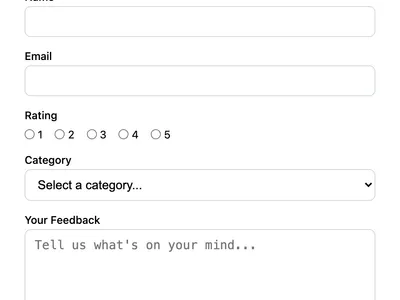
Feedback Form
Collect user feedback with a rating, category, and message. Great for product feedback, customer satisfaction, or feature requests.
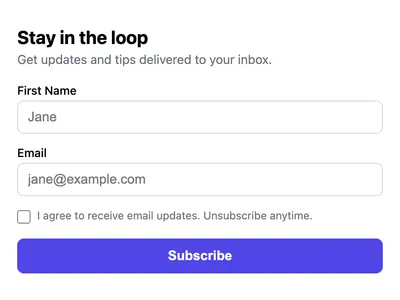
Newsletter Signup Form
A simple newsletter signup form with email, name, and consent checkbox. Collect subscribers without a mailing list service.
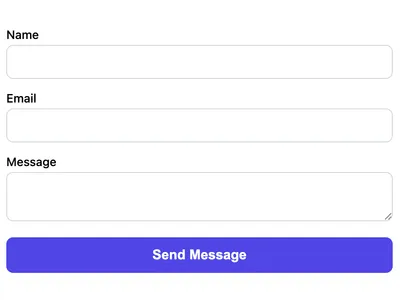
Basic Contact Form
A minimal HTML contact form with name, email, and message fields. Works on any website with no CSS framework required.
Frequently asked questions
How do I analyze survey results?
Export all submissions as CSV from the FormWit dashboard. Open in a spreadsheet to count responses, calculate averages, and create charts.
Can I make the survey anonymous?
Yes. Remove or make the email field optional. FormWit doesn't require any identifying field — it captures whatever fields you include.
How do checkboxes appear in submissions?
When a user selects multiple checkboxes with the same
name, FormWit stores all selected values as a comma-separated list.Get your form working in 30 seconds
- No credit card required
- Unlimited forms
- 100 submissions/month free